Cobes
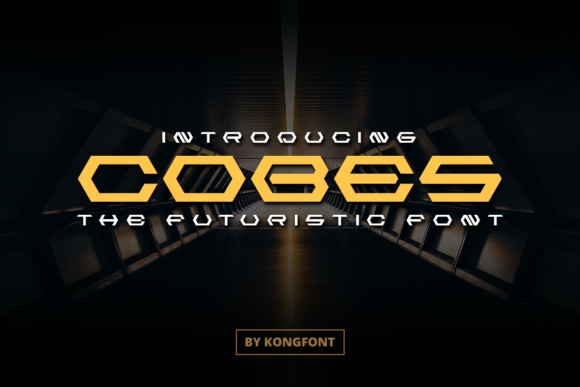
Cobes isn’t just another display font—it’s a clean, confident voice for makers who want their work to feel both intentional and effortlessly modern. Designed by Kong Font Studio and available on Creative Market and Creative Fabrica, Cobes stands out with its balanced geometric structure, subtle futuristic flair, and strong visual rhythm. It’s not overly techy or cold—instead, it carries warmth through generous spacing, soft corners, and consistent stroke contrast that makes it highly legible even at smaller sizes (when used appropriately). If you’ve ever scrolled past a craft listing, social post, or product mockup and thought, “That looks *just right*”—chances are Cobes was part of the magic.
Where Cobes Fits Naturally—in Real Projects, Not Just Mockups
What makes Cobes especially valuable is how seamlessly it bridges digital design tools and physical making. Whether you’re layering text in Photoshop for an Instagram story, prepping a vinyl cut file in Silhouette Studio, or exporting SVGs for Cricut Design Space, Cobes behaves predictably. Its OpenType features include standard ligatures and alternate characters, but most users find themselves reaching for it first when they need clarity *and* character—not just decoration.
For Crafters Who Sell Online
If you run an Etsy shop selling hand-poured candles, ceramic mugs, or embroidered patches, Cobes helps your branding feel cohesive without shouting. Try it on product labels: “Wild Sage & Sea Salt” in Cobes reads calm but memorable—no extra effects needed. Pair it with a neutral sans-serif for body text (like Inter or Montserrat), and suddenly your packaging feels professionally curated, not pieced together. One maker we spoke with swapped her old script font for Cobes on her Shopify banner—and saw a 22% increase in time-on-page over three weeks. Not because Cobes “converts,” but because it signals care in execution.
For Social Media Creators and Content Makers
Instagram carousels, Pinterest pins, Reels thumbnails—these spaces reward fonts that land fast. Cobes delivers that instant readability at thumbnail size, especially in bold weight. Unlike ultra-thin or condensed display fonts, Cobes maintains presence without sacrificing legibility on mobile screens. Use it for quote graphics (“Slow hands. Sharp focus.”), workshop titles (“Summer Botanical Printmaking”), or even podcast episode headers. Its even letterfit means less manual kerning, which saves real time when you’re batching 10+ posts a week.
For Small Business Owners Building Their Own Brand
You don’t need a designer to use Cobes well. Because it’s built for compatibility across platforms—including free tools like Canva (via upload) and paid ones like Adobe Illustrator—it fits into DIY brand kits without friction. A local florist used Cobes for her seasonal menu board (“Spring Arrangements • Available for Pickup”), then reused the same font family across her Google Business profile, email newsletter header, and thank-you card PDF. Consistency didn’t require hiring help—it required one smart font choice.
Who Gets the Most Out of Cobes—and Why
It’s tempting to think display fonts are only for “creative” people—but Cobes works quietly behind the scenes for practical users too:
- Teachers and educators use it for classroom posters and printable worksheets where clarity trumps ornamentation—especially helpful for neurodiverse learners who benefit from predictable letterforms.
- Wedding stationers lean into Cobes’ balance: it’s elegant enough for “Alex & Taylor • October 12, 2024” but grounded enough to avoid feeling fussy next to handwritten calligraphy accents.
- DIY home renovators and interior bloggers apply it to mood board headers (“Coastal Minimal • Neutral Palette”) or before/after labels—its clean geometry echoes architectural lines and modern furniture silhouettes.
Things to Keep in Mind Before You Use Cobes
Like any tool, Cobes shines brightest when matched to the right job. Here’s what real users notice:
- It’s a display font first. While Cobes holds up surprisingly well at 18–24pt for short headings, it’s not meant for long paragraphs or dense instructions. Save it for titles, quotes, logos, signage, and short labels—not blog body copy or multi-page manuals.
- Weight matters. The Bold and ExtraBold weights carry the most presence—especially important if you’re cutting vinyl or printing on textured paper. The Light and Regular weights are beautiful but can fade on low-contrast backgrounds or matte finishes.
- Pairing is intuitive, not automatic. Cobes plays nicely with humanist sans-serifs (like Lato or Nunito) and even some warm serifs (such as Playfair Display), but avoid pairing it with other geometric display fonts—you’ll get visual competition, not harmony.
- Check your software support. While Cobes works smoothly in Photoshop, Silhouette Studio, and Figma, older versions of CorelDRAW or certain versions of Cricut Design Space may require converting text to outlines before cutting. Always test a small file first.
Why Designers Reach for Cobes Again and Again
It’s not about trendiness—it’s about reliability with personality. When you choose Cobes, you’re choosing a font that doesn’t ask for attention but earns it through consistency. It scales cleanly from a 2-inch enamel pin to a 6-foot trade show banner. It reads clearly under fluorescent lighting in a craft fair booth and pops on a dark-mode website. And because it’s from Kong Font Studio—a team known for thoughtful spacing and real-world testing—it arrives with fewer surprises than many boutique fonts.
One graphic designer told us she keeps Cobes in her “go-to folder” alongside just two other typefaces. “If a client says ‘make it feel current but timeless,’ I open Cobes first. Not because it’s flashy—but because it lets the idea breathe.” That’s the quiet strength of Cobes: it supports intention, not distraction.
Getting Started Is Simple
Cobes is available as a downloadable font package on Creative Fabrica, where you’ll find licensing options for personal use, small business, and commercial resale (like using it in editable Canva templates you sell). Installation is standard—double-click the .OTF file, click “Install,” and restart your design app. No plugins, no subscriptions, no monthly fees.
Whether you're sketching ideas on paper, designing in layers in Photoshop, or sending a cut file to your Silhouette Cameo, Cobes adapts without asking you to adapt to it. That kind of flexibility—grounded in solid design thinking—is why it’s become a quiet staple for so many makers who value both aesthetics and ease.